

Simon User Guide
New/Edit Test Service
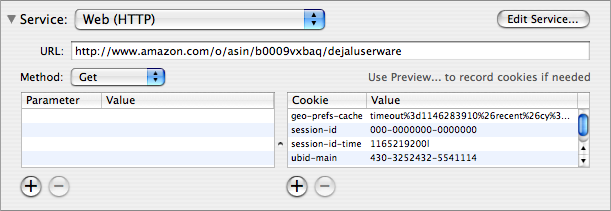
This is the Service section of the New/Edit Test window. The contents of this section varies depending on which service plug-in is selected in the pop-up menu at the top; the picture above shows the Web (HTTP) service. When you choose a service from this menu, the fields below change accordingly.
A service is a particular configuration of a service plug-in. A service plug-in does the actual work of checking the tests. There can be multiple services based on the same service plug-in, e.g. the IMAP, POP, SMTP, and SSH services are all variations of the Port Service Plug-in, each using a different port and with different session scripts. Similarly, the FTP Directory Listing, Samba SMB, Screenshots, and other services are based on the very versatile Script Service Plug-in.
You can add your own services, or modify these, via the Services window. [Tell me more....]
The default services are as follows. Click each to read more about them:
| Application | |||
| DNS | |||
| FTP | |||
| FTP Directory Listing | |||
| Incoming Mail (IMAP) | |||
| Incoming Mail (POP) | |||
| Mount | |||
| MySQL | |||
| Outgoing Mail (SMTP) | |||
| Ping | |||
| Specific DNS | |||
| SSH | |||
| Web (HTTP) | |||
Return to the New/Edit Test window page
Go to the User Guide Contents
Return to the main Simon page