Weather Events 1.2 released: wind gusts, improved location search, and other improvements

I’m pleased to announce an update of Weather Events, my app to record weather conditions on your calendar, available for macOS, iOS, and visionOS!

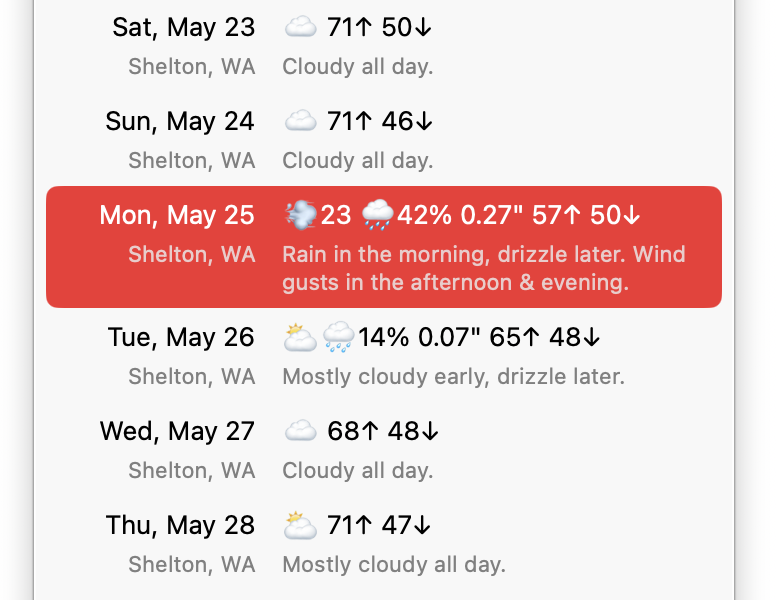
Version 1.2 now mentions wind gusts in the description for each breezy day, indicating about when it’ll be windy:

Wind gusts info

In the day editor, the locations menu now has an Other Location… command to search for a previous or new location:

Other Location option

When using that to search for a location, it now shows any matching previous locations at the top, followed by other matching locations. So it’s easy to find a location you’ve used in the past, without duplicating it:

Location search

It also now includes a calendar menu in the Settings when setting new day locations from calendar events, to optionally only look in one calendar instead of any:

Settings window

But wait, there’s more! Version 1.2 includes a bunch of other nice improvements and fixes:

  • Improved the speed and reliability of location searches.
  • Improved default names of locations outside the US and Canada to omit the region.
  • Improved handling of changing locations in different time zones.
  • Now cleans up unused locations.
  • Removed the Skip button to postpone calendar authorization during onboarding, at Apple’s request.
  • Fixed occasionally using a placeholder location.
  • Fixed sometimes unexpectedly using a full address for a location.
  • Fixed inability to click/tap on the location map when choosing a new location.
  • Fixed the About, Welcome, and Settings windows appearing behind those of other apps on macOS.
  • Fixed overlapping controls in the onboarding titlebar.
  • Fixed using too much iCloud data.
  • Fixed a rare crash.
  • Now requires OS 26 or later.

Want to try it?

If you already have the app, you can update via the App Store.

Otherwise, get Weather Events 1.2 now!

Simon 5.2b1 released

Surprise! It’s been three years since the previous update of Simon, my pro-level website and server monitoring tool, but here’s the first beta release of version 5.2.

This update includes support for macOS Tahoe, including making all components universal, so they work on Apple silicon and Intel-based Macs. Plus improvements to the Web Page service, the tests list, the Preview pane, and several services, filters, and notifiers, amongst other changes. 

This is a beta release, but should be safe for anyone to install. If mission-critical, you might want to hold off for now, though, or install on another Mac. I would appreciate help in testing this update. Please let me know if you find any issues, or have any feature requests.

Read on for details.

Support for Tahoe

  • Updated the app to work better with macOS Tahoe (26.x).
  • Now requires macOS Monterey (12.4) or later.
  • All components are now universal, so work on Apple silicon and Intel-based Macs; a requirement for macOS 27.

Improved Web Page Service

  • The Web Page service now handles errors better when using the option to capture the rendered source.
  • Instead of resulting in a failure if the initial fetch gives an error, it waits for the rendered page to finish, and determines the result and HTML from that.
  • If the loaded HTML has an error, it tries to do a clean load, ignoring the provided headers, to match the preview shown.

Tests list refinements

  • Simplified the time ranges in the tests list when using relative times; instead of showing “10 min, 18 sec ago (3 secs)” for the last check time (and duration), it now just shows “checked 10 min (3 secs)”; the extra units didn’t add much value, and including “checked” makes it more clear what this value is.
  • Similarly the time of the last change is now displayed as “changed 2 hr ago”.
  • If a test doesn’t have any filters, it instead shows “changes not filtered”.
  • When a test is currently failing, it now omits the empty recovery time, so just shows the failure time like “failed 7 min ago”.
  • When a test has recovered, it now shows the duration in addition to the failure and recovery times, e.g. “failed 45 min to 6 min ago (39 mins)”.
  • Since Simon has been around for 14 years, fixed logic that assumed dates over 10 years were not sensible.

Preview improvements

  • Fixed remembering and restoring the Preview pane position when switching between tests with a web preview (like Web Page ones) and just a transcript (like Ping).
  • Fixed Check Now not checking all or multiple selected tests when the Preview pane is visible.
  • Changed the Preview message for the Notifiers list to clarify to use File ▸ Notify Now or the reload toolbar button to try a notifier.

Updated variables

  • Renamed {TestFailureCount} as {TestErrorCount}: the current failure/error streak.
  • Renamed {TestRecoveryCount} as {TestRecoveredCount}: the current recovery count.
  • Added {TestCheckCount}: the total number of times the test has been checked.
  • Added {TestSuccessCount}: the total number of successful checks.
  • Added {TestFailureCount}: the total number of failed checks.
  • Added {TestRecoveryCount}: the total number of recoveries from a failure.

Other changes

  • Fixed the Application service when checking if an app is running; it was previously timing out.
  • Improved the Application service output to sort the values alphabetically, so checking multiple times won’t trigger a spurious change.
  • Fixed the Get Average Ping Response Time filter; it was giving an error before.
  • Fixed the test editor summary sometimes listing the “Block” filter as “BlockBlock”.
  • Fixed the Setup Assistant showing the page to import web bookmarks on first run.
  • Fixed notifiers sometimes not firing when syncing is off, especially ones from versions prior to 5.0.
  • Updated the default Dejal Reddit test to work based on recent Reddit changes (the filters needed adjusting).

Want to try it?

If you are using the direct edition, you can change your Updates settings to include beta releases, then use the Check for Updates feature in the app to update.

Otherwise, download the beta now!

Time Out 3.0.3 released

Time Out version 3 was released recently. I just released version 3.0.3 to fix a couple more issues that may affect some people:

– Fixed the Full Countdown to Next Break status option not showing seconds when less than an hour.
– Fixed a possible crash when showing the Last Done Break Label in the status item.

It will be available from the Mac App Store and Setapp as soon as they approve it, and is immediately available direct from the Dejal website.

If you missed it, version 3 includes:

  • macOS Tahoe support
  • Exclusions are now Rules, and more powerful
  • A new theme editor, and image and text theme types
  • Added a Duplicate Break command
  • Enhanced the postpone/skip control limits option to per break, hour, or day
  • But wait, there’s more!

See the What’s New page for details.

Time Out prices increasing soon

Time Out version 3 was recently released. On the Support Time Out page in the app, I have a notice that the prices for the supporter options will be increasing soon. Time Out has an unusual payment model: most features are available to use completely free, but some features are available as rewards for people who support ongoing development. The prices haven’t changed since version 2 was released way back in 2016 (yes, a decade ago!), so I felt it was about time for a small adjustment. But I didn’t want to surprise people, so I announced it in the app, and now on the blog, so people can become a supporter, or renew their support, before the price goes up.

Time Out is available from the Mac App Store, Setapp, or direct from the Dejal website

If you missed it, version 3 includes:

  • macOS Tahoe support
  • Exclusions are now Rules, and more powerful
  • A new theme editor, and image and text theme types
  • Added a Duplicate Break command
  • Enhanced the postpone/skip control limits option to per break, hour, or day
  • But wait, there’s more!

See the What’s New page for details.

Time Out is still free; you can use it for as long as you like without paying anything. But people who contribute to ongoing development by becoming supporters get the advanced features as a reward. You can become a supporter for 3, 6 or 12 months; these one-time payments do not auto-renew, but you can extend your support if you wish. The features will remain available permanently. You can become a supporter in the app, or via the Dejal Store.

Become a supporter now, before the price goes up! (And yes, even if you’re still using version 2.9.7, you can become or renew your supporter status.)