DejalNews #91: introducing Recal: calendar tools for busy people… and more updates

DejalNews header

Welcome

This is DejalNews, an occasional newsletter from Dejal.

Please note that this is the last issue of DejalNews. See below for details.

Introducing Recal: calendar tools for busy people

I’ve just released the first version of a brand new app, called Recal. This is a collection of tools to help with managing the Apple Calendar, including a quick editor of events, templates for frequently used events, including a placeholder and a list of values, plus a report of hours matching criteria (with optional hourly rate), a utility to move or delete matching events, and a tool to summarize events to reduce the number of events.

Learn more on the web page for Recal. Available now for macOS, iOS, iPadOS, and visionOS.

Time Out version 3.0.4 released

Time Out version 3.0.4 includes some nice fixes:

  • Fixed the time of the first break of the day when using the From Fixed Time scheduling option.
  • Fixed an issue where the Break for time could be longer than the Every interval, which doesn’t make sense.
  • Fixed a calendar-based break having a duration of zero instead of the duration of the calendar event.
  • Fixed the Teams Meeting rule script, which stopped working due to Microsoft renaming the background process that handles an active meeting.
  • Fixed a crash when changing the Label for a break to a grayscale color.
  • When an app is in full-screen, clicking the Time Out status item will now show Time Out’s window on top of the full-screen window.

It is available from the Mac App Store, via Setapp, and direct from the Dejal website.

Weather Events 1.2 released

Weather Events version 1.2 was released.

  • Now mentions wind gusts in the description for each breezy day, indicating about when it’ll be windy.
  • In the day editor, the locations menu now has an Other Location… command to search for a previous or new location.
  • Improved the speed and reliability of location searches.
  • Improved default names of locations outside the US and Canada to omit the region.
  • Improved handling of changing locations in different time zones.
  • Now cleans up unused locations.
  • Added a calendar menu in the Settings when setting new day locations from calendar events, to optionally only look in one calendar instead of any.
  • Removed the Skip button to postpone calendar authorization during onboarding, at Apple’s request.
  • Fixed occasionally using a placeholder location.
  • Fixed sometimes unexpectedly using a full address for a location.
  • Fixed inability to click/tap on the location map when choosing a new location.
  • Fixed the About, Welcome, and Settings windows appearing behind those of other apps on macOS.
  • Fixed overlapping controls in the onboarding titlebar.
  • Fixed using too much iCloud data.
  • Fixed a rare crash.
  • Now requires OS 26 or later.

If you already have the app, you can update via the App Store.

Otherwise, get Weather Events 1.2 now!

Simon 5.2b1 released

Simon version 5.2b1 was released. This update includes better support for macOS Tahoe, an improved Web Page service, tests list refinements, Preview improvements, updated variables, and much more.

It is currently a beta release, but is entirely usable. A general release will be forthcoming soonish.

If you are using the direct edition, you can change your Updates settings to include beta releases, then use the Check for Updates feature in the app to update. Otherwise, download the beta now!

This is the last issue of DejalNews

Due to low subscriber numbers and a huge amount of spam signups, I’ve decided to retire the DejalNews email newsletter. This newsletter has been going, off and on, for about 30 years — yes, three decades! It has had some hiatuses, and the subscriber list has been reset at least once, but it has never been super popular. I’m a little sad to discontinue it, but people just don’t seem to be into email nowadays, and the mail provider doesn’t do a very good job of weeding out garbage signups.

Who knows, I might bring it back again in the future; wouldn’t be the first time! But I don’t have any plans to do so at this stage.

Follow Dejal on Mastodon, Bluesky, Threads, Micro.blog, Facebook, Reddit, and more

Do you use one of the popular social media platforms? Dejal is probably there!

See this blog post for links to Dejal’s account on those platforms and more.

– David

Introducing Recal, calendar tools for busy people

Do you have lots of events in Apple Calendar? Perhaps you frequently enter variations of the same events, need to calculate how many hours you spent on something, want to move a group of events, or would like to tidy old events while keeping a useful summary.

Apple Calendar is great at keeping events, but editing lots of them or making sense of all that history can be tedious. That’s why I created Dejal Recal, a collection of focused utilities for creating, reviewing, and tidying calendar events.

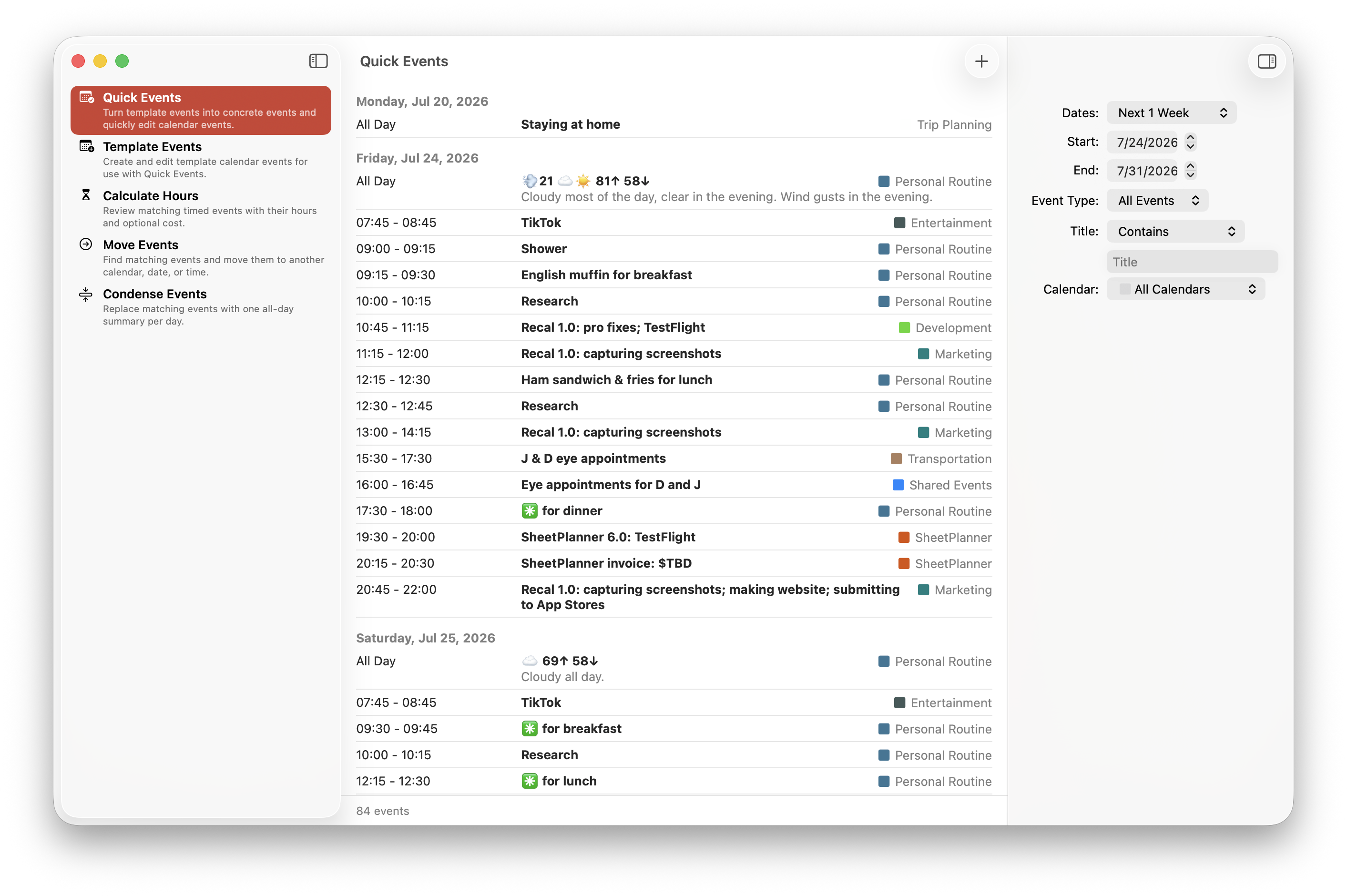
Quick Events in Recal

Each utility can work with a specific date range, selected calendars, timed or all-day events, and an optional title filter, so you can focus on just the events that matter.

Quick and reusable events

Quick Events makes it easy to create or update calendar events. It can turn reusable template events into concrete events, with support for titles, times, time zones, calendars, notes, and custom values.

Template Events is where you build and edit those reusable templates. A template can include a repeating schedule and a placeholder with a list of values, which is useful when you regularly enter similar events with a few differences. Your templates sync privately via iCloud, so they’re available on all of your devices.

Editing a template event in Recal

Calculate hours and costs

Calculate Hours totals the duration of matching calendar events. This is handy for reviewing how much time you spent on a project, client, activity, or anything else you record on your calendar.

With Recal Pro, you can also enter an hourly rate to calculate the corresponding cost.

Calculating calendar hours and costs in Recal

Move and condense events

Move Events can move matching events to another calendar, date, time, or time zone, or delete matching events. You can preview the proposed changes before anything is updated.

Move calendar events

Condense Events can replace a busy collection of events with one all-day summary for each day, while preserving the original details in the summary event’s notes. This is a convenient way to tidy old calendar history without losing the useful information.

Condensing calendar events

Since moving or condensing events can make significant changes, Recal shows you what it proposes to do first and requires you to explicitly unlock the operation before proceeding.

Privacy

Recal only accesses your calendars after you grant permission, and only makes the event changes you choose. Your templates sync privately through your iCloud account. Recal doesn’t include third-party trackers.

Recal Pro

Recal is free to download and useful without a purchase. Optional Recal Pro monthly, yearly, or lifetime purchases unlock unlimited templates, cost calculations, moving and condensing events, and other advanced features.

Want to try it?

Recal is available on the App Store for macOS, iOS, iPadOS, and visionOS. It requires OS 26 or later.

Get Recal 1.0 now!