Introducing a TestFlight of Time Out version 3.0
· release · Time Out

Read More
· release · Time Out
Read More
· DejalNews · Preminder · release · Time Out · Weather Events

Read More
· Preminder · release
Read More
· release · Weather Events
Read More
· DejalNews · release · Weather Events
Read More
· release · Time Out
What’s this? Yet another update of Time Out?! This is getting ridiculous, but I think I’ve finally caught all of the issues with older macOS versions. Why did this happen, you may wonder? It’s my own fault, of course. I’m working on version 3.0, which will require the latest macOS version. But it included a bunch of bug fixes, which I decided to bring forward to version 2.9.x, since some of them were affecting a bunch of people. But I had stripped out logic to check for API availability, since that wasn’t needed in version 3.0… and thus ended up including some function calls that were not…
Read More
· release · Time Out
Let’s make it three: another update of Time Out, my popular break reminder tool. When I did the recent 2.9.4 update, I figured I didn’t need to do a beta release, since it was just basic bug fixes. Oops… no, beta releases are useful even for bug fixes, since I can’t test on older OS versions, and sometimes Apple changes things that break apps, even apps for taking breaks. Version 2.9.6 includes a critical fix for people on older macOS versions: Fixed a crash on pre-Sonoma macOS versions. Sorry about that! If you missed them, versions 2.9.5 and 2.9.4 were released a few days ago, and included…
Read More
· release · Time Out
I'm a little embarrassed that I needed to do a second release, but here it is: another update of Time Out, my popular break reminder tool. Version 2.9.5 includes a critical fix for people on older macOS versions, and properly fixes something I attempted to fix in the previous update: Fixed the app launch helper unexpectedly opening Terminal on older macOS versions. Fixed the settings window unexpectedly appearing after restarting the Mac, when the Dock icon is hidden. If you missed it, version 2.9.4 was released a couple of days ago, which included several more fixes and tweaks: Fixed…
Read More
· release · Time Out
I'm pleased to announce an update of Time Out, my popular break reminder tool. Version 2.9.4 includes some nice fixes and tweaks: Fixed the settings window unexpectedly appearing after restarting the Mac, when the Dock icon is hidden. Fixed misnaming the app in the sidebar when using a When Open app exclusion. Fixed the Also skip breaks during focus exclusion option. Fixed a break with a large negative duration when scheduling from the calendar with no more events. Fixed the tooltip for the Ask When to Start scheduling option. When there are multiple displays available, now uses the names of…
Read More
· release · Time Out
I'm pleased to announce an update of Time Out, my popular break reminder tool. This update includes some nice fixes and tweaks: Now uses more modern ways to start the break helper, the automatically start on login option, and access the System Settings. Fixed app icons not appearing in the Activity log for apps with display names that don't match their filename. Fixed a break sometimes stopping too early when using the Ask When to Start option. Fixed a break not being rescheduled past midnight when a natural break occurs. Added themes for the Sinclair Trails blog and YouTube channel, and…
Read More
· release · Simon
I’m pleased to announce the general release of an update of my website and server monitoring app for macOS: Simon version 5.1.1. This update includes just a few — but important — fixes: If not signed in to iCloud, Simon now doesn't offer syncing, with a message explaining that, instead of assuming it's available and sometimes crashing. Fixed a crash when dragging to reorder filters, notifiers, and reports in the test editor. When loading the default data when first using the app, the services, filters, and notifiers are now organized into groups (this was previously only done when updating the…
Read More
· release · Simon
Read More
· release · Simon
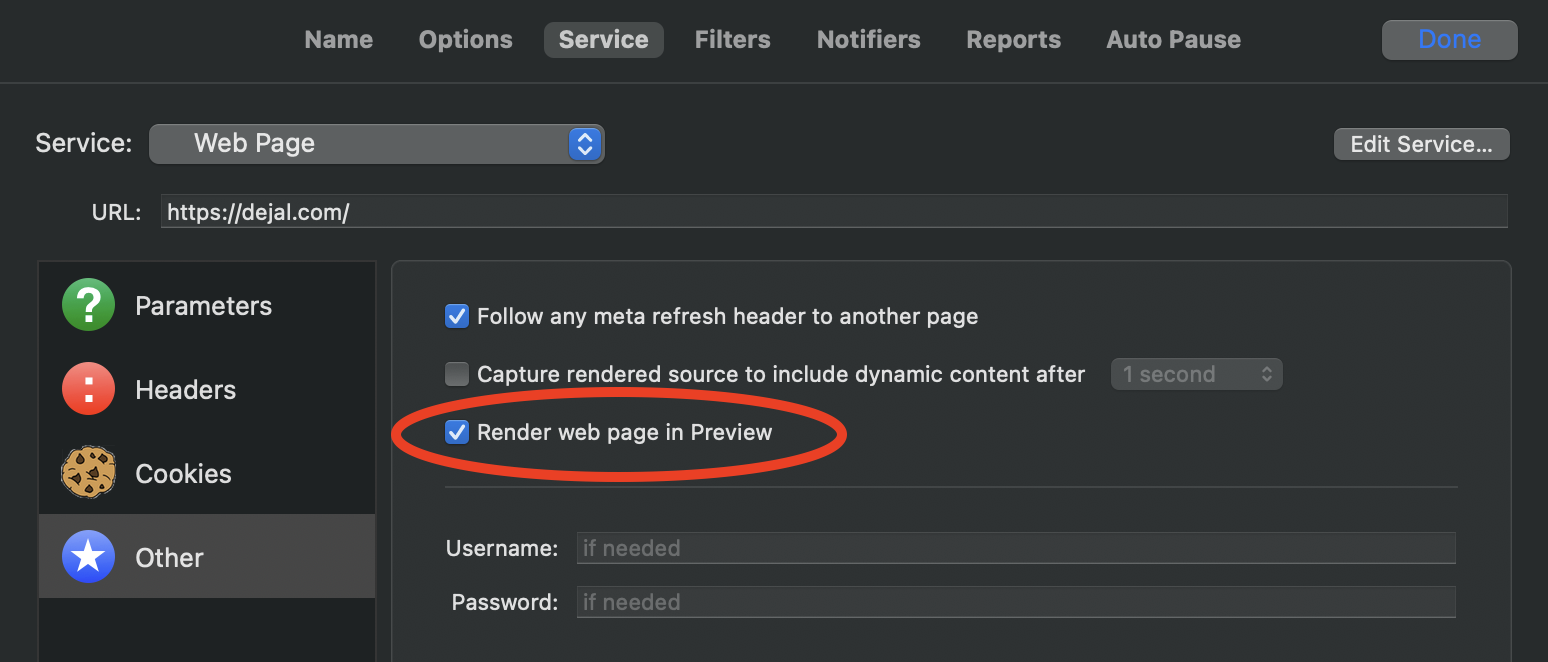
A second beta of Simon version 5.1 is now available. Version 5.1b2 just has a few improvements: Added an option on the Advancedsettings page to show the Debug menu, as an easier way to toggle it. Updated the example tests. Updated French localization. As a reminder, version 5.1 includes lots more changes since the previous release, including: New Web Page test option to render the page in the Preview Added a new option to the Other page when editing a Web Page test to control whether or not to render the page in the Preview. By default it is on, preserving the usual behavior. But if you turn…
Read More
· release · Time Out
Read More